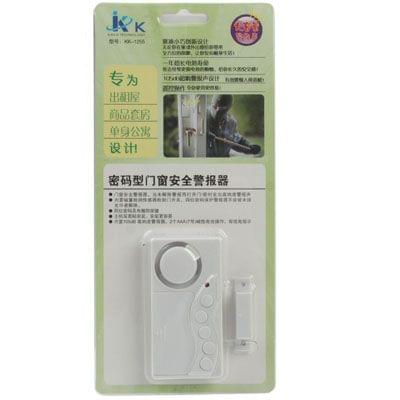
Description
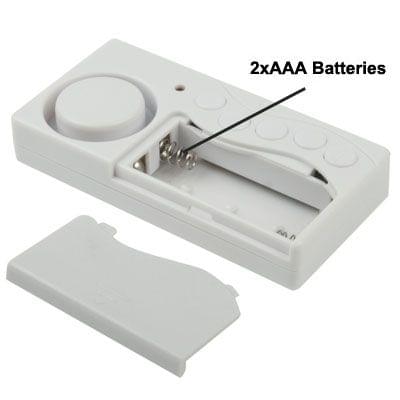
1) Supply battery: 2AAA alkaline batteries operation
2) Battery life: continuous standby for more than two years (switch 5 times per day basis)
3) Operating temperature: <-10~60
4) Working humidity: <80%
5) Storage Temperature:-20~70
6) Weight: 0.08kg
Battery Installation:
1) Open the battery door, and loaded two AAA alkaline batteries.
2) When the battery after you install the unit will sound one long, one short ‘Be…Be’
Prompt the battery to a successful installation:
1) Please use alkaline batteries in order to get good use of effects, such as the use of other batteries can cause the battery use shorter or alarm sound.
Installation:
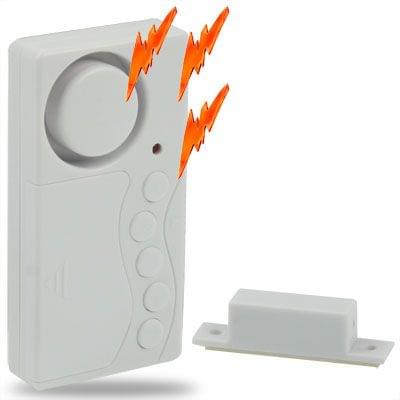
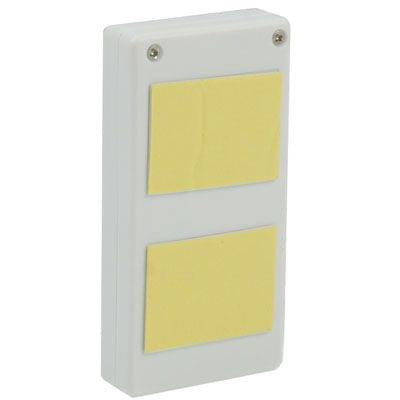
1) Select windows and doors installation location, with water and a rag clear clean the mounting surface, the double-sided adhesive tape on the bottom and then the unit attached to the clean position.
2) Installed host, and then double-sided paste the magnet solid set in the host next to the door or door frame, pay attention please the magnets arrow at the arrow to the right host.
Note:
1) The machine is for indoor use, do not install in direct sunlight or rain, do not install in the region of high pollution or high humidity.
2) The magnetic sensor of the machine on the right side of the body’s mount the magnet in the right side of the machine and align the two arrows.
3) If the host is installed on the door, install the magnet on the door frame, turn, if the host is installed on the door frame should be a magnet mounted on the door, to ensure that the door is open magnet to leave the host to detect.
4) Ensure close the door the host and the magnet installation distance should not exceed 10mm.
Use:
Change your password (first time or replace the battery, do the following to change the password)
1) Make sure the unit is not alert (flashing LED every three seconds in the garrison state once).
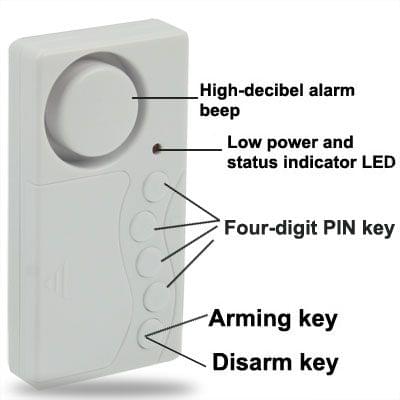
2) Press [1] key more than 2 seconds, the machine will beep 1 short ‘Be’, and the LED flashes prompted to enter the password to change the status.
3) Enter the old four-digit PIN (for the first time , to change the password please enter the factory default password ‘1234’ ) , the machine prompts two short sound of ‘Be…Be’, then enter the new four-digit PIN , the machine will ring three times ‘the Be…Be…Be’ mention show the password change , please remember the new password.
4) Error in the process of enter a password, the machine will ring long and Du…’, please repeat
5.3.1.2~5.3.1.3.
5) Keep the battery when you forget your password split out two minutes after installing the battery the unit will restore/sites/default the factory default password’1234’.
6) After replacing the battery password will be restore/sites/defaultd to factory settings, change your password, please click on the above-mention operation.
Enter the delay time setting:
1) Native in the police state, the door was opened to the alarm there is some delay, this delay is used to input to the user to lift the machine into the password, factory setting is 3 seconds, when you first use based on your actual use of the situation set up this time,
2) Make sure the unit is not alert (security status LED flashes every three seconds).
3) More than two seconds.[2]key, the machine will beep 1 short ‘Be’, and the LED flashes, suggesting that the delay to change the satus.
4) Then [1] key once, the machine will ring three times’ Be…Be…Be’ prompt delay is changed to 0 seconds, the doors open alarm immediately, if you press the [2] key to change the delay for 3 seconds, [3] key to change the delay for five seconds, [4] key the delay is changed to 10 seconds.
5) Based on your intended use and operation of proficiency set this delay time.
6) When replacing the battery, please re-set the delay time,
Arming and disarming:
1) In standby mode, press ON/OFF button once, the machine will ring three times ‘of Bi of Bi of Bi ‘ prompts the machine to enter the armed mode 15 seconds after the alert status and the LED will flash once every three seconds.
2) In the deployed state, enter the four personal password and then press the ON/OFF key, the unit will beep ‘of Bi…’ sound prompts the machine had to withdraw from the deployment mode in this mode, the machine does not prompt outside of any function in addition to low power.
3) Alarm is triggered
4) Detected in the deployed status, such as the door changed to open the action
Shipping Policy
Shipping Policy
Thank you for shopping at Uniqkart! We are committed to delivering your orders in a timely and efficient manner. Please read our shipping policy below to understand our procedures and timelines.
1. Shipping Destinations
-
We currently ship to addresses within India.
-
We do not ship to P.O. Boxes, remote areas, or locations with restricted courier access. If your address falls under these categories, please contact our support team for assistance before placing your order.
2. Shipping Methods & Carriers
-
We partner with trusted courier services such as FedEx, Delhivery, and Blue Dart to ensure reliable delivery.
-
Shipping method depends on destination, weight, and size of items. You’ll see available options and estimated delivery times during checkout.
3. Shipping Costs
4. Order Processing and Delivery Times
-
Handling Time: Orders are typically processed within 2–4 business days.
-
Transit Time: Once shipped, delivery within India usually takes 14–16 business days.
-
Estimated Delivery Time: The total estimated time from order confirmation to delivery is 18–20 business days.
-
Order Cut-off Time: Orders placed after 5:00 PM IST will be processed on the next business day.
5. Order Tracking
-
After your order ships, you’ll receive a confirmation email with your tracking number and link.
-
Please allow 24–48 hours for tracking info to appear on the courier’s website.
6. Delivery Issues
-
Ensure your shipping address is accurate and complete. We are not responsible for delays or non-delivery due to incorrect/incomplete addresses or shipments to remote areas.
-
For delivery issues, contact us at:
📧 support@uniqkart.in
📞 +91 4214102307
We’ll coordinate with carriers to resolve issues quickly.
7. Lost or Damaged Shipments
-
Report lost or damaged shipments within 48 hours of receipt.
-
Provide order number, details, and photos if applicable.
-
We’ll work with the carrier to arrange replacements or refunds.
8. Contact Us
For any questions:
📧 support@uniqkart.in
📞 +91 4214102307
Business Hours:
Monday - Friday: 10:00 AM - 5:00 PM (IST)
Saturday: 10:00 AM - 4:00 PM (IST)
Sunday: Closed
Address:
63/15, Vasantha Road, Anna Nagar, Dharapuram, Tiruppur, Tamil Nadu, 638656
Return & Refund
Return and Refund Policy
At Uniqkart, we are committed to ensuring your complete satisfaction with your purchase. If you are not entirely satisfied with your order, we're here to help. Please read our policy below regarding returns and refunds.
1. Eligibility for Returns
-
Returns accepted within 14 days of receiving the order.
-
Items must be unused, unworn, and in original packaging with tags intact.
-
Proof of purchase required (order number or receipt).
2. Non-Returnable Items
Returns are not accepted for:
-
Customized or personalized products
-
Clearance items marked as non-returnable
-
Intimate products due to hygiene reasons
3. Initiating a Return
Steps to initiate a return:
-
Email us at support@uniqkart.in within 14 days of receiving your order. Include your order number, item(s), and reason.
-
Follow the return instructions provided by our support team.
Return Shipping:
-
Customer Responsibility: Customers bear return shipping costs unless the item is damaged, defective, or incorrect.
-
Uniqkart Responsibility: If the item is damaged or incorrect, we cover return shipping and provide a prepaid label or arrange pickup.
We recommend using a trackable service and insuring the shipment. We are not responsible for lost or damaged returns in transit.
4. Inspection and Processing
-
Items will be inspected upon receipt for eligibility.
-
Status of return (approved/rejected) will be notified via email.
-
Approved returns will be processed for a refund or exchange.
5. Refunds
-
Refunds are issued to the original payment method.
-
Allow 7–10 business days after approval for processing.
-
Original shipping charges are non-refundable, unless the item was faulty or incorrect.
6. Exchanges (If Applicable)
-
Exchanges are accepted for all products, whether due to damage, defect, incorrect item, or if you want a different size or color.
-
Please contact our support team for assistance with your exchange request.
-
Exchanges are subject to product availability.
7. Damaged or Defective Items
-
Email us within 24-48 hours of delivery with order number, issue details, and clear photos.
-
We’ll offer a replacement, full refund, or appropriate resolution.
8. Cancellations
-
Orders can be cancelled before shipment.
-
Once shipped, cancellation is not possible; please use the return process instead.
9. Contact Us
For any questions or concerns, reach out to us:
📧 Email: support@uniqkart.in
📞 Phone: +91 4214102307
Business Hours:
Monday - Friday: 10:00 AM - 5:00 PM (IST)
Saturday: 10:00 AM - 4:00 PM (IST)
Sunday: Closed
Address:
63/15, Vasantha Road, Anna Nagar, Dharapuram, Tiruppur, Tamil Nadu, 638656